Local scene
A local web scene with a building model, in a <LocalSceneView>.
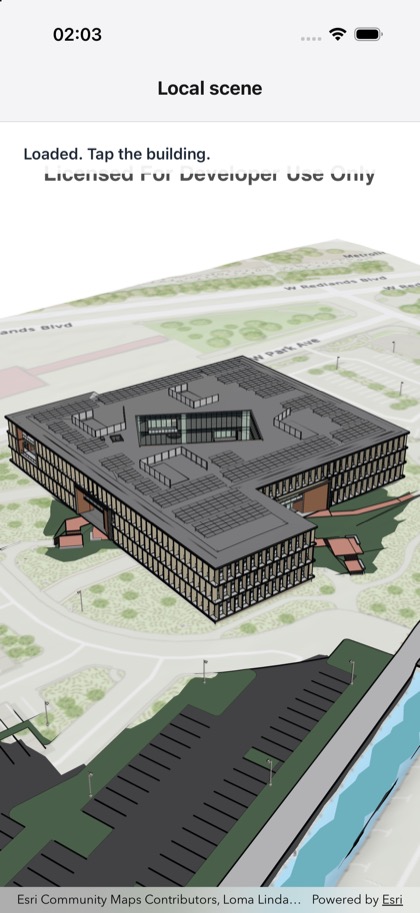
This is the real source of the example app’s three-d/local-scene screen — run it on a device
or simulator to see it live.
import { useState } from 'react';import { StyleSheet, Text, View } from 'react-native';import { LocalSceneView, Scene } from 'expo-arcgis';
// A public local web scene with a building scene layer (Esri's Building E, used by the Toolkit's// building explorer example).const LOCAL_WEB_SCENE_ID = 'b7c387d599a84a50aafaece5ca139d44';
/** * Shows a local web scene in a `<LocalSceneView>`: a building model on a local, flat surface. Tap * the building to read where you tapped. */export default function LocalScene() {  const [status, setStatus] = useState('Loading the scene…');  return (    <Scene portalItem={{ itemId: LOCAL_WEB_SCENE_ID }}>      <LocalSceneView        style={{ flex: 1 }}        onSceneLoaded={() => setStatus('Loaded. Tap the building.')}        onSceneLoadError={({ nativeEvent }) => setStatus(`Failed: ${nativeEvent.message}`)}        onTap={({ nativeEvent }) =>          setStatus(            `Tapped ${nativeEvent.mapPoint.latitude.toFixed(5)}, ${nativeEvent.mapPoint.longitude.toFixed(5)}`          )        }      >        <View style={styles.banner} pointerEvents="none">          <Text style={styles.text}>{status}</Text>        </View>      </LocalSceneView>    </Scene>  );}
const styles = StyleSheet.create({  banner: {    position: 'absolute',    top: 12,    left: 12,    right: 12,    padding: 10,    borderRadius: 10,    backgroundColor: 'rgba(255, 255, 255, 0.92)',  },  text: { fontSize: 15, fontWeight: '600', color: '#1f2937' },});