Search
Search places with suggestions; results drawn into the app’s overlay (iOS).
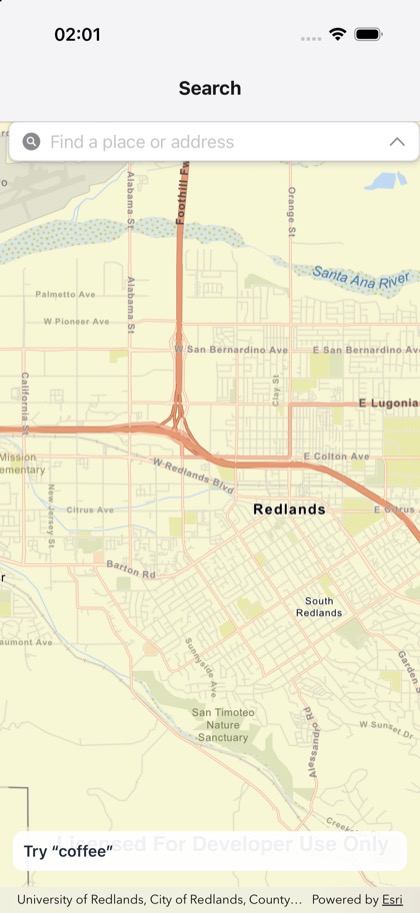
This is the real source of the example app’s toolkit/search screen — run it on a device
or simulator to see it live.
import { useRef, useState } from 'react';import { StyleSheet, Text, View } from 'react-native';import { GraphicsOverlay, Map, MapView, type GraphicsOverlayRef } from 'expo-arcgis';import { Search } from 'expo-arcgis-toolkit';
/** * The ArcGIS Toolkit's search over the map: suggestions as you type, the world geocoder, results * drawn into a graphics overlay the app declares, prioritized around the view's center, and * "Repeat search here" once the map moves. iOS only; on Android it renders nothing. */export default function SearchSample() {  const results = useRef<GraphicsOverlayRef>(null);  const [query, setQuery] = useState('');  return (    <Map basemap="arcGISStreets" initialViewpoint={{ latitude: 34.0565, longitude: -117.1956, scale: 72_000 }}>      <MapView style={{ flex: 1 }}>        <GraphicsOverlay ref={results} />        <Search          resultsOverlay={results}          queryCenter="view"          repeatSearch          onQueryChange={setQuery}          style={styles.search}        />        <View style={styles.banner} pointerEvents="none">          <Text style={styles.text}>{query ? `Query: ${query}` : 'Try “coffee”'}</Text>        </View>      </MapView>    </Map>  );}
const styles = StyleSheet.create({  search: { position: 'absolute', top: 0, left: 0, right: 0, height: 380 },  banner: {    position: 'absolute',    bottom: 40,    left: 12,    right: 12,    padding: 10,    borderRadius: 10,    backgroundColor: 'rgba(255, 255, 255, 0.92)',  },  text: { fontSize: 15, fontWeight: '600', color: '#1f2937' },});