Bookmarks
The map’s bookmarks, over the map view and bound by ref below it (iOS).
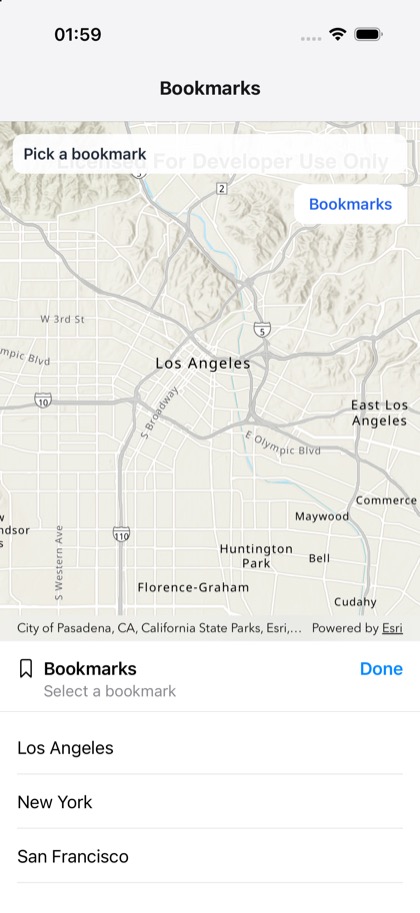
This is the real source of the example app’s toolkit/bookmarks screen — run it on a device
or simulator to see it live.
import { useRef, useState } from 'react';import { Pressable, StyleSheet, Text, View } from 'react-native';import { Map, MapView, type MapViewHandle, type Viewpoint } from 'expo-arcgis';import { Bookmarks } from 'expo-arcgis-toolkit';
// Bookmarks declared on the map; a web map's own saved bookmarks list the same way.const BOOKMARKS: { name: string; viewpoint: Viewpoint }[] = [  { name: 'Los Angeles', viewpoint: { latitude: 34.05, longitude: -118.24, scale: 200_000 } },  { name: 'San Francisco', viewpoint: { latitude: 37.77, longitude: -122.42, scale: 200_000 } },  { name: 'New York', viewpoint: { latitude: 40.71, longitude: -74.0, scale: 200_000 } },];
/** * The ArcGIS Toolkit's bookmarks, bound to the map view both ways: over the map, placed inside the * `<MapView>` (the button opens it, picking closes it), and below the map, outside it, through the * view's ref. */export default function BookmarksSample() {  const mapView = useRef<MapViewHandle>(null);  const [overlay, setOverlay] = useState(false);  const [picked, setPicked] = useState<string | null>(null);  return (    <View style={{ flex: 1 }}>      <Map basemap="arcGISTopographic" initialViewpoint={BOOKMARKS[0].viewpoint} bookmarks={BOOKMARKS}>        <MapView ref={mapView} style={{ flex: 1 }}>          {overlay ? (            <Bookmarks              style={styles.overlay}              onSelectionChange={(bookmark) => setPicked(bookmark.name)}              onIsPresentedChange={setOverlay}            />          ) : (            <Pressable style={styles.button} onPress={() => setOverlay(true)}>              <Text style={styles.buttonText}>Bookmarks</Text>            </Pressable>          )}          <View style={styles.banner} pointerEvents="none">            <Text style={styles.text}>{picked ? `Went to ${picked}` : 'Pick a bookmark'}</Text>          </View>        </MapView>      </Map>      <Bookmarks        geoView={mapView}        style={styles.below}        onSelectionChange={(bookmark) => setPicked(bookmark.name)}      />    </View>  );}
const styles = StyleSheet.create({  overlay: {    position: 'absolute',    top: 60,    right: 12,    width: 260,    height: 260,    borderRadius: 12,    overflow: 'hidden',    backgroundColor: 'white',  },  button: {    position: 'absolute',    top: 60,    right: 12,    paddingHorizontal: 14,    paddingVertical: 10,    borderRadius: 10,    backgroundColor: 'white',  },  buttonText: { fontSize: 15, fontWeight: '600', color: '#2563eb' },  banner: {    position: 'absolute',    top: 12,    left: 12,    right: 12,    padding: 10,    borderRadius: 10,    backgroundColor: 'rgba(255, 255, 255, 0.92)',  },  text: { fontSize: 15, fontWeight: '600', color: '#1f2937' },  below: { height: 260, backgroundColor: 'white' },});